5.2Theme A — Unity and diversity
Tool 2: Technology — IB Biology SL Revision Notes & Topical Questions
5 min read 12 parts Lesson 3 of 11 Unit quiz
Lesson summary
5.2 Tool 2: Technology — IB BIOLOGY SL notes: Use sensors, data loggers, spreadsheets, databases and simulations to collect and process biological data, and evaluate their limitations.Sensor (probe) = an input device that detects a physical or chemical change and converts it into…
- Advantages
- Temperature probe
- Physiological monitors
- Calibration
- Sampling rate (Hz)
- Rate from a graph
Part 1 of 10Sensors and data loggers
Sensor (probe)
Sensor (probe) an input device that detects a physical or chemical change and converts it into an electrical signal
- Common IB sensors measure temperature, pH, light intensity, O2, CO2, pressure, heart rate and conductivity.
Data logger
Data logger a device that records sensor readings automatically at set intervals over a set period
- It lets data be sent to a computer and formatted into a table.
- The computer then calculates averages, plots graphs and finds gradients faster and more accurately than a person.
Advantages
- Advantages frequent, precise, continuous data with less human error
- A logger detects rapid or long-term changes a human could not record, such as overnight CO2 levels in a leaf chamber.
Part 2 of 10Examples of sensors
pH meter
- pH meter measures acidity or alkalinity as a pH value
- pH is a measure of the concentration of hydrogen ions (H+).
- It is used when investigating the effect of pH on enzyme activity.
Temperature probe
- Temperature probe measures the temperature of a system or reaction and can replace a thermometer
Physiological monitors
- Physiological monitors a spirometer for lung volumes and a heart-rate monitor during exercise
Other technologies
- GPS and remote sensing for field mapping.
- Camera traps for animal surveys.
- Digital microscopes and image analysis software, such as ImageJ, for counting cells or measuring areas.
- Software analysis of videos, such as joints in motion.
Part 3 of 10Using a sensor and data logger
1
Choose a suitable sensor, such as a dissolved O2 probe, and calibrate it against known standards.
2
Connect the sensor to the data logger and set the sampling rate and total duration.
3
Set up the experiment, keep the controlled variables constant and start recording.
4
Change the independent variable, such as light intensity, and allow equilibration time before each recording period.
5
Export the data to a spreadsheet and calculate rates from gradients.
6
Plot graphs, calculate means and standard deviations, and apply statistical tests.
Calibration
- Calibration a pH probe is calibrated in buffers of pH 4 and 7, and an O2 probe in air (about 20.9%)
Sampling rate (Hz)
Sampling rate (Hz) number of readings divided by time in seconds
- The interval between readings is 1 divided by the sampling rate.
- It must be high enough to capture rapid changes.
Rate from a graph
- Rate from a graph the gradient, change in y divided by change in time, for example % s-1
Part 4 of 10Limitations and comparison
- Limitations
- cost, the need for calibration, drift over time, probe response time and interference
- A CO2 sensor can be affected by humidity.
| Feature | Manual | Sensor and data logger |
|---|---|---|
| Frequency of readings | Limited | Very high |
| Human error | Reaction time and reading errors | Reduced, but calibration is needed |
| Duration | Only while the observer is present | Overnight or for days |
| Cost | Low | Higher |
Part 5 of 10Spreadsheets and graphs
Spreadsheets and graphs
Spreadsheet
Spreadsheet software that organises data in rows and columns and uses formulae to process it
- Raw data are entered, categorised and organised into columns and rows.
- Formulae calculate mean, median, SD, % change and rate and reduce arithmetic mistakes.
- Check that the cell ranges are correct.
Useful functions
- =AVERAGE(range), =STDEV(range) and =T.TEST
- (range1, range2, 2, type)
Graphs
- Graphs built-in functions draw graphs and charts to show trends, patterns and correlations
- A continuous independent variable gives a line or scatter graph.
- A categorical variable gives a bar chart.
- Error bars show SD or the range of repeats.
Large datasets
- Large datasets population data with large ranges are easier to handle on a computer
Part 6 of 10Colorimetry and calibration curves
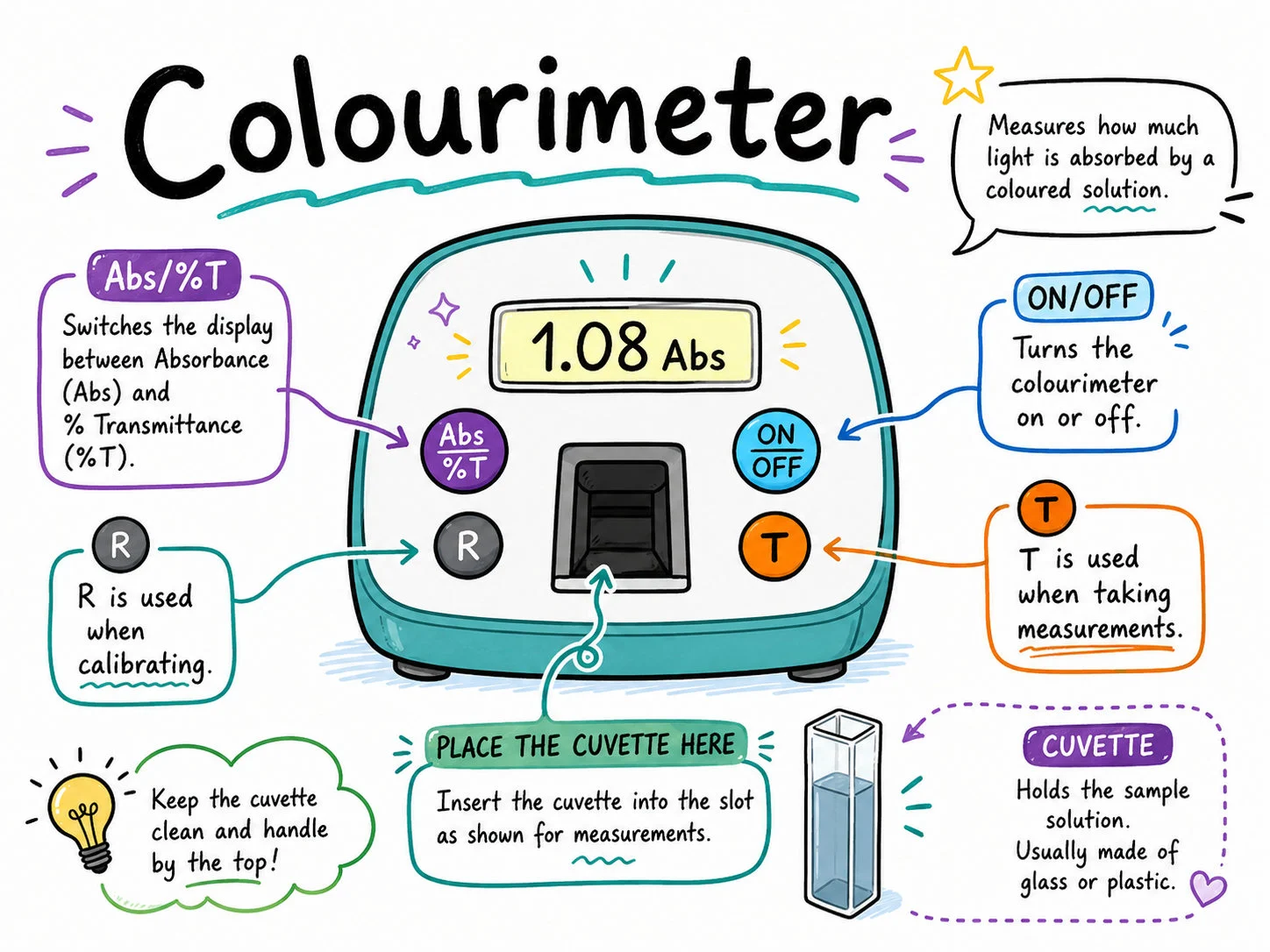
Absorbance
- Absorbance measured by a colorimeter and proportional to concentration within a range
Calibration curve
- Calibration curve made from standards of known concentration so absorbance can be converted to concentration
Part 7 of 10Databases and bioinformatics
1
Database
Database a structured collection of data that can be searched, sorted, filtered and analysed quickly
- Nucleotide databases such as GenBank and protein databases such as UniProt and PDB are freely accessible.
- They are used to compare genes, find homologues and study evolution.
- GBIF records where species occur.
2
BLAST
- BLAST searches a database with a query sequence and ranks the hits by similarity
- It is used, for example, to identify a species from DNA barcoding.
3
Percentage similarity
Percentage similarity identical positions divided by total aligned positions, × 100
4
Multiple sequence alignment
- Multiple sequence alignment software such as Clustal lines up homologous sequences
- The number of differences is used to build a cladogram.
- This assumes mutations accumulate at a roughly constant rate, as in the molecular clock.
Part 8 of 10Using BLAST
1
Obtain the DNA sequence, for example from a barcoding gene, in FASTA format.
2
Open the NCBI BLAST website and choose nucleotide BLAST (blastn).
3
Paste in the sequence, select the database and run the search.
4
Examine the hits ranked by percentage identity and E-value, where a lower E-value is more significant.
5
Download the top sequences and align them to build a cladogram with tree-building software.
Part 9 of 10Models, simulations and molecular visualisation
Simulation
- Simulation a computer model that represents a system with mathematical rules so variables can be changed and outcomes predicted
- Examples are population growth, genetic drift, Hardy-Weinberg, epidemic spread and predator-prey cycles.
- They allow many repeats quickly and let variables be changed that cannot be changed in real life.
- They are only as good as their assumptions, so outputs should be checked against real data.
Mesocosm
- Mesocosm a small enclosed model ecosystem in which environmental variables can be changed under control
- It is used to predict what may happen in real ecosystems.
Molecular visualisation
- Molecular visualisation software such as JSmol displays 3D structures from PDB files
- It shows active sites, enzyme-substrate fit and levels of protein structure.
- Colours can show α-helices, β-pleated sheets and active sites.
Part 10 of 10More from the specification
- Digital simulation models in science
- computerized models simulate ecological population dynamics and genetic drift under variable environmental selection pressures.
Key terms
| Term | Meaning |
|---|---|
| Sensor (probe) | A device that detects a physical or chemical quantity and converts it into an electrical signal. |
| Data logger | A device that records sensor readings automatically at set time intervals. |
| Sampling rate | The number of readings a data logger takes per unit time. |
| Database | An organised, searchable store of data such as GenBank, UniProt or PDB. |
| BLAST | Software that compares a query sequence with a database and scores the similarity of hits. |
| Sequence alignment | Arranging sequences so that homologous positions line up, with gaps where needed. |
| Simulation | A computer model of a system with rules, used to predict outcomes when variables change. |
| Mesocosm | A small enclosed model ecosystem used to study the effect of changing variables. |
Avoid these mistakes
1
Assuming sensor readings are always accurate — sensors need calibration and can drift
2
Treating a simulation output as real data — it depends on its assumptions and must be validated
3
Choosing a low sampling rate for a rapid change — the logger would miss the change
4
Using a high BLAST E-value as a good match — a lower E-value means a more significant match
Last updated:
\n